# Sparkle & Atmosphere: Bringing Your R Dashboards to Life


<script src="/rmarkdown-libs/htmlwidgets/htmlwidgets.js"></script>
<script src="/rmarkdown-libs/canvas-confetti/confetti.browser.min.js"></script>
<script src="/rmarkdown-libs/confetti-binding/confetti.js"></script>
<script src="/rmarkdown-libs/fireworks-js/index.umd.js"></script>
<script src="/rmarkdown-libs/fireworks-binding/fireworks.js"></script>
<script src="/rmarkdown-libs/weather-binding/weather.js"></script>


<p>We often talk about R in terms of <em>utility</em>: cleaning data, training models, and building efficient Shiny apps. But we rarely talk about the <em>feeling</em> of an application. Does your dashboard feel like a sterile tool, or does it feel like an experience?</p>
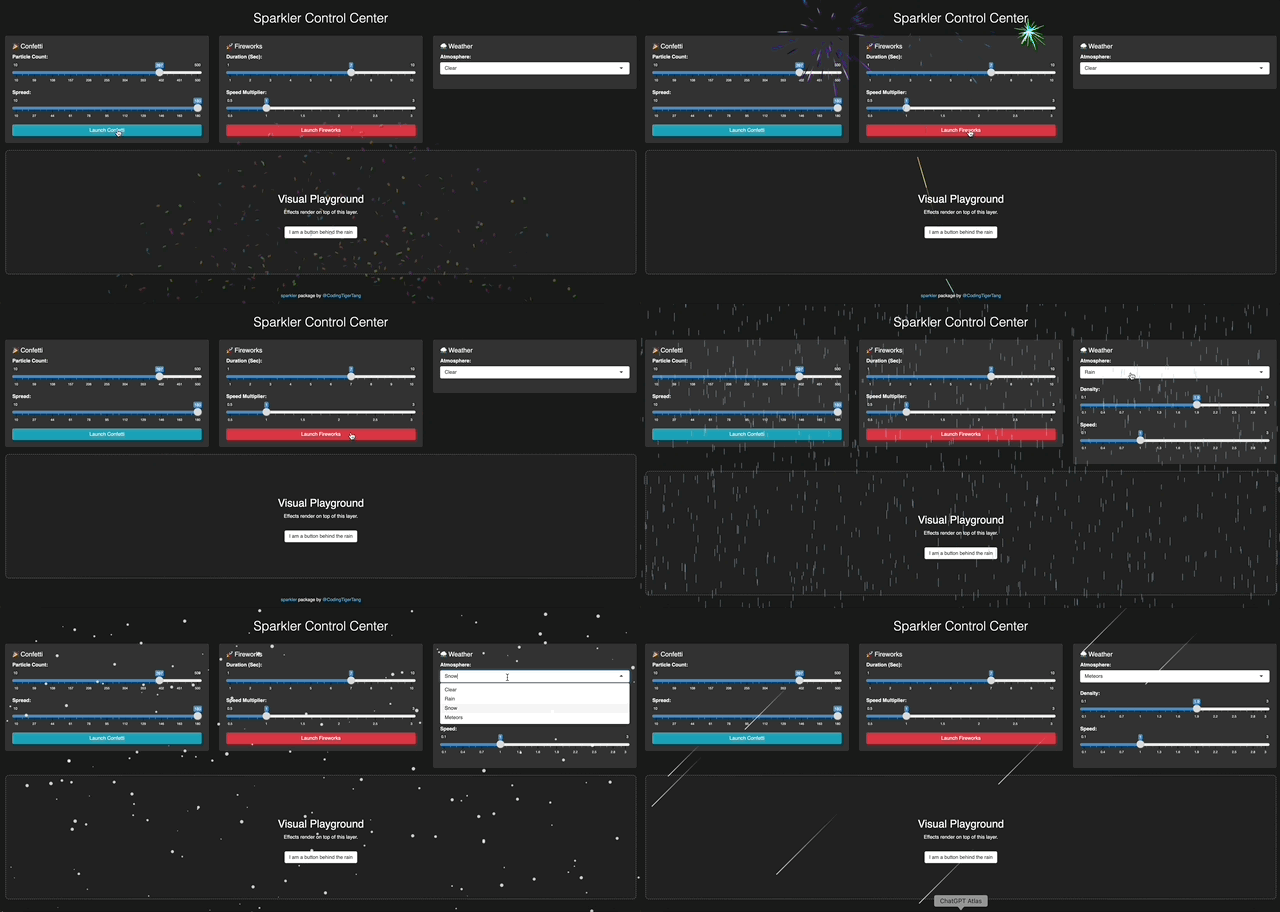
<p>Introducing <a href="https://github.com/CodingTigerTang/sparkler"><strong><em>sparkler</em></strong></a>, a package designed to inject mood and micro-interactions into the R ecosystem. Give the live demo a try <a href="https://tigertang.shinyapps.io/sparkler/">here</a>.</p>
<p><img src="/posts/sparkler_files/sparkler-demo-s.gif" /></p>
<style>#blog-confetti, #blog-fireworks, #blog-snow, #blog-rain, #blog-meteor { display: none; }</style>
<div id="blog-confetti" style="width:0px;height:0px;" class="confetti html-widget"></div>
<script type="application/json" data-for="blog-confetti">{"x":{"particleCount":200,"spread":150},"evals":[],"jsHooks":[]}</script>
<div id="blog-fireworks" style="width:0px;height:0px;" class="fireworks html-widget"></div>
<script type="application/json" data-for="blog-fireworks">{"x":{"duration":15,"speed":0.7},"evals":[],"jsHooks":[]}</script>
<div id="blog-snow" style="width:0px;height:0px;" class="weather html-widget"></div>
<script type="application/json" data-for="blog-snow">{"x":{"type":"snow","density":1.5,"speed":1,"fullscreen":true},"evals":[],"jsHooks":[]}</script>
<div id="blog-rain" style="width:0px;height:0px;" class="weather html-widget"></div>
<script type="application/json" data-for="blog-rain">{"x":{"type":"rain","density":0.6,"speed":0.6,"fullscreen":true},"evals":[],"jsHooks":[]}</script>
<div id="blog-meteor" style="width:0px;height:0px;" class="weather html-widget"></div>
<script type="application/json" data-for="blog-meteor">{"x":{"type":"meteor","density":1.5,"speed":1,"fullscreen":true},"evals":[],"jsHooks":[]}</script>
<script>
      document.addEventListener('DOMContentLoaded', function() {
        var ids = ['blog-confetti', 'blog-fireworks', 'blog-snow', 'blog-rain', 'blog-meteor'];
        var winner = ids[Math.floor(Math.random() * ids.length)];
        var el = document.getElementById(winner);
        if(el) {
          el.style.display = 'block';
          // Force resize to ensure canvas fills the browser window
          setTimeout(function() { window.dispatchEvent(new Event('resize')); }, 100);
        }
      });
    </script>
<div id="background" class="section level3">
<h3><strong>Background</strong></h3>
<p>Data science is about storytelling, and every good story needs atmosphere. Whether you want to reward a user for a job well done or set a seasonal mood for your quarterly report, visual cues play a huge role in how users perceive your work.</p>
<p>It started while building a <a href="https://tigertang.org/wheel_of_fortune_in_shiny/">Wheel of Fortune</a> in Shiny. As I hacked together confetti and sound effects for the winner, I realized we needed to bridge the gap between R’s utility and the ‘delight’ of the web. Tools like <code>shinyjs</code> give us power, but <a href="https://github.com/CodingTigerTang/sparkler"><strong><em>sparkler</em></strong></a> gives us atmosphere.</p>
</div>
<div id="what-is-sparkler" class="section level3">
<h3><strong>What is <a href="https://github.com/CodingTigerTang/sparkler"><em>sparkler</em></a></strong>?</h3>
<p>It wraps lightweight JavaScript engines to render beautiful, high-performance visual effects directly in your browser. It currently features three distinct “Vibes”:</p>
<p>1. 🎉 <strong>The Reward (Confetti)</strong>: Perfect for success messages. When a user hits a target or submits a complex form, give them a burst of joy.</p>
<p>2. 🚀 <strong>The Celebration (Fireworks)</strong>: For the big moments. Think hitting a major KPI or launching a new product.</p>
<p>3. ⛈️ <strong>The Atmosphere (Weather)</strong>: Rain, Snow, and Meteors. Use these to reflect the data context.</p>
<ul>
<li><p>is the market “cooling off” (Snow)?</p></li>
<li><p>Is it a “stormy” quarter (Rain)?</p></li>
<li><p>Or is the project “shooting for the stars” (Meteors)?</p></li>
</ul>
</div>
<div id="delight-without-disruption" class="section level3">
<h3><strong>Delight Without Disruption</strong></h3>
<p>One of the biggest challenges with adding visuals to Shiny is layout. You usually have to reserve space for a plot, which pushes your buttons and text around.</p>
<p><a href="https://github.com/CodingTigerTang/sparkler"><strong><em>sparkler</em></strong></a> takes a different approach. It uses a <strong>Full-Screen Overlay Architecture</strong>.</p>
<p>When you trigger an effect, it renders on a dedicated canvas layer floating <em>above</em> your application (Z-Index 9999).</p>
<ul>
<li><p>It takes up <strong>0 pixels</strong> of layout space.</p></li>
<li><p>It respects your design (Your Bootstrap grid stays perfect).</p></li>
<li><p>It is “Click-Through” (Users can still click buttons underneath the rain).</p></li>
</ul>
</div>
<div id="how-to-use" class="section level3">
<h3><strong>How to use</strong></h3>
<ol style="list-style-type: decimal">
<li><strong>The “Success Button”</strong></li>
</ol>
<p>Let’s say you have a task in your app that takes a lot of effort. When the user finishes, you want to acknowledge that effort.</p>
<p><img src="/posts/sparkler_files/sparkler-shiny-app-post.gif" /></p>
<pre class="r"><code>library(shiny)
library(sparkler)

ui &lt;- fluidPage(
  confettiOutput(&quot;celebration&quot;), # The invisible antenna
  actionButton(&quot;btn&quot;, &quot;Complete Task&quot;)
)

server &lt;- function(input, output) {
  observeEvent(input$btn, {
    output$celebration &lt;- renderConfetti({
      sparkler::confetti(particle_count = 150,spread = 180)
    })
  })
}</code></pre>
<ol start="2" style="list-style-type: decimal">
<li><strong>Setting the Mood in RMarkdown/Quarto</strong></li>
</ol>
<p>Because <a href="https://github.com/CodingTigerTang/sparkler"><strong><em>sparkler</em></strong></a> is built on <code>htmlwidgets</code>, it works natively in static HTML reports too. You can make gentle snow fall over your “Year-End Review” with a single chunk.</p>
<pre class="r"><code># In your RMarkdown or Quarto file
sparkler::weather(type = &quot;snow&quot;, density = 1.5, fullscreen = TRUE)</code></pre>
<p>It even works on blogs built with RMarkdown or Quarto. In fact, try refreshing this page, you’ll see a different random effect each time! (For the best experience, switch to <strong>dark mode</strong> in the upper right corner.)</p>
</div>
<div id="lastly" class="section level3">
<h3><strong>Lastly</strong></h3>
<p>Building <a href="https://github.com/CodingTigerTang/sparkler"><strong><em>sparkler</em></strong></a> reminded me that software can be fun. There is something satisfying about typing one line of R code and seeing a digital celebration on screen.</p>
<p>📦 GitHub Repo: <a href="https://github.com/CodingTigerTang/sparkler">github.com/CodingTigerTang/sparkler</a></p>
<p>🎮 Live Demo: <a href="https://tigertang.shinyapps.io/sparkler/">tigertang.shinyapps.io/sparkler/</a></p>
<p>📄 Documentation: <a href="https://codingtigertang.github.io/sparkler/">codingtigertang.github.io/sparkler/</a></p>
<p>I would love to see what you create. If you add sparkles to your dashboard, tag me!</p>
</div>