 Tiger Tang
Sparkle & Atmosphere: Bringing Your R Dashboards to Life
We often talk about R in terms of utility: cleaning data, training models, and building efficient Shiny apps. But we rarely talk about the feeling of an application. Does your dashboard feel like a sterile tool, or does it feel like an experience?
Introducing sparkler, a package designed to inject mood and micro-interactions into the R ecosystem. Give the live demo a try here.
Background
Data science is about storytelling, and every good story needs atmosphere. Whether you want to reward a user for a job well done or set a seasonal mood for your quarterly report, visual cues play a huge role in how users perceive your work.
It started while building a Wheel of Fortune in Shiny. As I hacked together confetti and sound effects for the winner, I realized we needed to bridge the gap between R’s utility and the ‘delight’ of the web. Tools like shinyjs give us power, but sparkler gives us atmosphere.
What is sparkler?
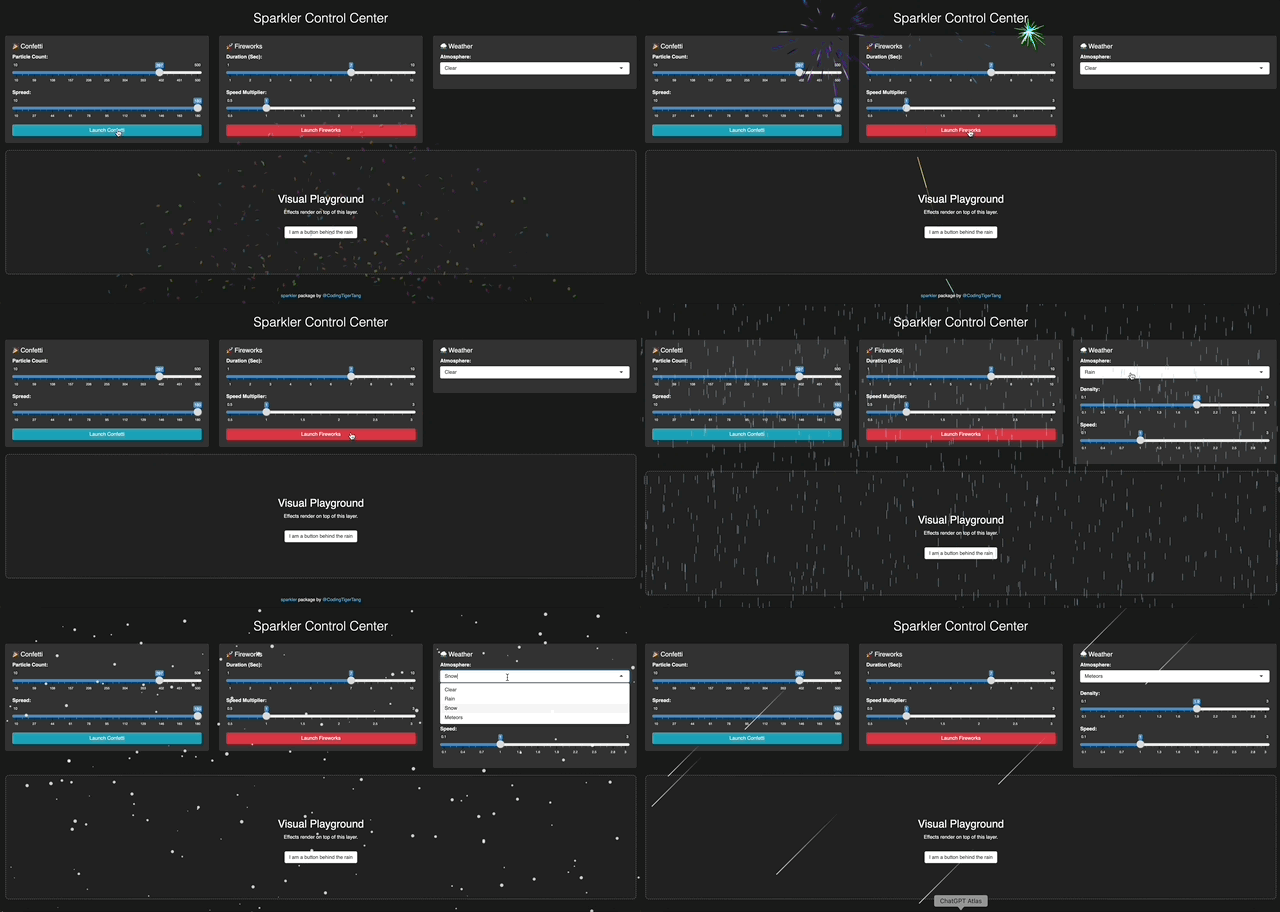
It wraps lightweight JavaScript engines to render beautiful, high-performance visual effects directly in your browser. It currently features three distinct “Vibes”:
1. 🎉 The Reward (Confetti): Perfect for success messages. When a user hits a target or submits a complex form, give them a burst of joy.
2. 🚀 The Celebration (Fireworks): For the big moments. Think hitting a major KPI or launching a new product.
3. ⛈️ The Atmosphere (Weather): Rain, Snow, and Meteors. Use these to reflect the data context.
is the market “cooling off” (Snow)?
Is it a “stormy” quarter (Rain)?
Or is the project “shooting for the stars” (Meteors)?
Delight Without Disruption
One of the biggest challenges with adding visuals to Shiny is layout. You usually have to reserve space for a plot, which pushes your buttons and text around.
sparkler takes a different approach. It uses a Full-Screen Overlay Architecture.
When you trigger an effect, it renders on a dedicated canvas layer floating above your application (Z-Index 9999).
It takes up 0 pixels of layout space.
It respects your design (Your Bootstrap grid stays perfect).
It is “Click-Through” (Users can still click buttons underneath the rain).
How to use
- The “Success Button”
Let’s say you have a task in your app that takes a lot of effort. When the user finishes, you want to acknowledge that effort.

library(shiny)
library(sparkler)

ui <- fluidPage(
  confettiOutput("celebration"), # The invisible antenna
  actionButton("btn", "Complete Task")
)

server <- function(input, output) {
  observeEvent(input$btn, {
    output$celebration <- renderConfetti({
      sparkler::confetti(particle_count = 150,spread = 180)
    })
  })
}- Setting the Mood in RMarkdown/Quarto
Because sparkler is built on htmlwidgets, it works natively in static HTML reports too. You can make gentle snow fall over your “Year-End Review” with a single chunk.
# In your RMarkdown or Quarto file
sparkler::weather(type = "snow", density = 1.5, fullscreen = TRUE)
It even works on blogs built with RMarkdown or Quarto. In fact, try refreshing this page, you’ll see a different random effect each time! (For the best experience, switch to dark mode in the upper right corner.)
Lastly
Building sparkler reminded me that software can be fun. There is something satisfying about typing one line of R code and seeing a digital celebration on screen.
📦 GitHub Repo: github.com/CodingTigerTang/sparkler
🎮 Live Demo: tigertang.shinyapps.io/sparkler/
📄 Documentation: codingtigertang.github.io/sparkler/
I would love to see what you create. If you add sparkles to your dashboard, tag me!